
Before we start this course, I would like to revisit the purpose of these series. My purpose is to build a “Full stack interconnect” profile that is rare in the industry. Most engineers reside in one silo: They are either manufacturing experts (IPC workmanship), or Signal Integrity Physicists (Lecro/Samtec) or Network Admins (Infiniband). By combining all the trainings, I’m positioning myself to perform root cause analysis at a speed and depth that neither a pure admin nor a pure cable assembler could achieve.
This course gives me the tool to see how the physics manifest in the digital domain of NVL72 system. With this course, I’m hoping to query the hardware myself to see exactly how it is failing, allowing me to reverse engineer the physical defect.
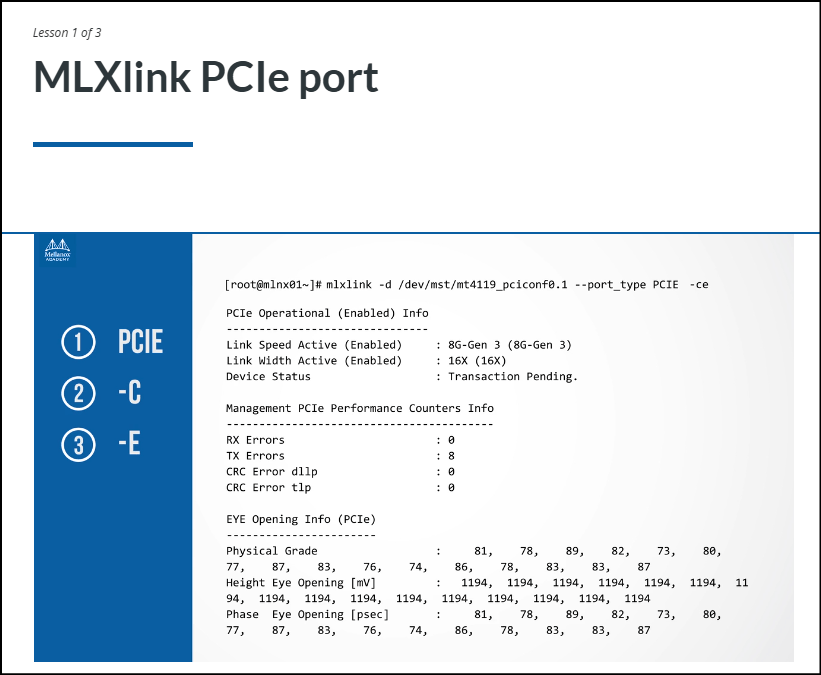
So this is how mlxlink PCIe port debug tool shows the detailed MRI Scan of that PCIe connector when queried. The command line basically saying “Look at the PCIe port (–port_type PCIE), tell me the counters (-c) and show me the Eye Diagram (-e)”
This command results in 3 sections:
- Section 1: Did we plug in all 16 pins? (Yes/No)
- Section 2: Is the connection static-free? (Error Counters)
- Section 3: How strong is the electrical pulse? (Eye Height/Grade)
Section 1 – PCIe Operational (Enabled) Info :
- The card and motherboard agreed to talk at Gen 3 speeds
- All 16 lanes (pairs of copper conductors) are connected.
How would an SQE interpret this? Lets say if Link Width was 8X or 4X, it means the connector is physically unseated or some pins are bent dirty, forcing them to shut down the lanes. This is a physical assembly defect.
Section 2 – Management PCIe Performance Counters Info:
RX Errors/TX Errors: The number of times the signal was so garbled it had to be reset.CRC Error: “Cyclic Redundancy Check.” The number of data packets that arrived corrupted.
How would an SQE interpret this? If the counts are 0, then the connection is perfect. Its bad if the numbers keeps climbing, it means we have a dirty connection. In the previous blog, we spoke about data packets lifecycle and how they originate from source node and unwrap at destination node. We spoke about CRC errors, which means the data packets arrived “corrupted”. It usually means the signal was distorted just enough that the receiver couldn’t decide if a bit was 1 or a 0.
Section 3 – EYE Opening Info (PCIe):
This is like a “Signal Quality Scorecard”
- Height Eye Opening [mV] : Indicates The voltage (strength). If this number is low (<100) then the signal is weak. currently the number is 1194 mV, means 1.19V. This is a strong, loud signal.
- Phase Eye Opening [psec]: Indicates The Timing (Clarity). Although I did not understand this concept clearly, I understood that the acceptance and rejection criteria depends on PCIe Speed Generation (Gen3, Gen4, or Gen5).
- Physical Grade; Indicates the summary score. Think of it like a test score out of 100. If Lane 0 is 90 and Lane 2 is 0, then we have a specific manufacturing defect (like a scratch or bad solder joint) on Lane 1 only.
Overall, this concept is a great way to see if the card is plugged in correctly and if the electrical copper connection is clean.

 Quality Thinking